Showing posts with label AIR. Show all posts

Saturday, January 24, 2015

[AIR] How to build ANE 64-bit


How to build ANE 64-bit

TL;TR

http://easynativeextensions.com/making-your-ios-apps-universal/

Or try doing thing backward here ;)

  1. Open your Mac.
  2. Open Facebook check it fast and close it!
  3. Make sure Adobe AIR SDK is update to most recent by brew it. (or install if you don't have one)
  4. $ brew upgrade adobe-air-sdk
  5. Make sure AIR SDK path is set.
    $ export AIR_HOME=/usr/local/Cellar/adobe-air-sdk/16.0.0.272/libexec
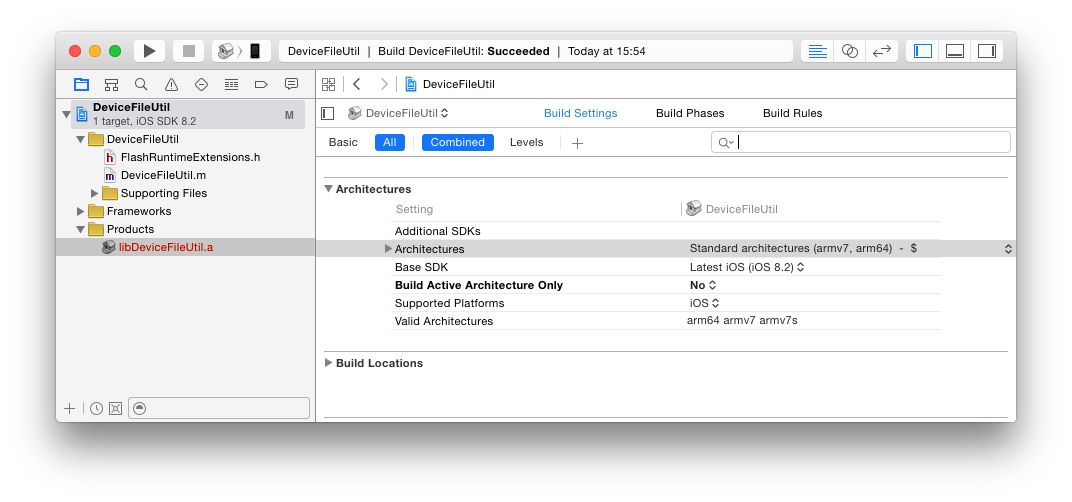
  6. Clone my working ANE 64-bit ready https://github.com/katopz/ane-device-file-util
  7. Go to /ane-device-file-util/as3/bin
    $ cd /ane-device-file-util/as3/bin
    try
    $ bash build.sh
  8. Open your Twitter, tweet something and close it!
  9. Smile!
  10. That's it! 
You just build ANE from working static library "libDeviceFileUtil.a", now let's try make one your own! Follow this step below...

Monday, December 15, 2014

[ANE] Love is in the AIR

I'm now busy with my new iOS app in Swift language, but I'm still doing AS3/AIR in daily basis job also still blog about AS3 and AIR so it's not seem to dead yet this year thanks for ANE ;)

Lucky me I got skill in Objective-C, Java, C++, C# so I can finish my job with plenty of my homemade ANE but some developer is left behind...

Lucky you, This day we got plenty of free/paid ANE, one of them is DiaDraw


And more lucky is my reader will get 20% discount  until the end of 2014 by use coupon code

Friday, November 7, 2014

[AIR] Workaround for broken Base64 via AIR 15


Problem : Refer to AIR 15 release note here's list of painful know issues ;)

  1. [iPhone 6 Plus] Wrong screen size and dpi is returned through the runtime APIs.
  2. [iPhone 6 Plus] iPad Launch image is displayed on iPhone 6 Plus in standard display mode.
  3. Unable to install the application on iOS Simulator after updating iOS SDK and iPhone simulator with 7.1.
  4. [HMAOT] Hurlant Base64,encode doesn't work with new fast packaging engine.
  5. iOS tlfText not rendering, when application packaged with new fast packaging engine.
For me, I just got weirdo 0.01.010.1.0.. instead of normal Base64 after packing IPA and use it via iPad3 iOS 8, but lower iOS version seem to be fine.

Solution :  Refer to  Adobe said here...


I know you guy are lazy dude like me so here we go below quick fix for download below! :D

Sunday, August 17, 2014

[ANE] New Admob AIR Native Extension 2014


New Admob Native Extension 2014

Problem


On August 31, 2014, legacy AdMob is shutting down. All legacy ad serving will stop soon, But no worry! Open source is here to help both iOS and Android or each! :D

Tuesday, August 5, 2014

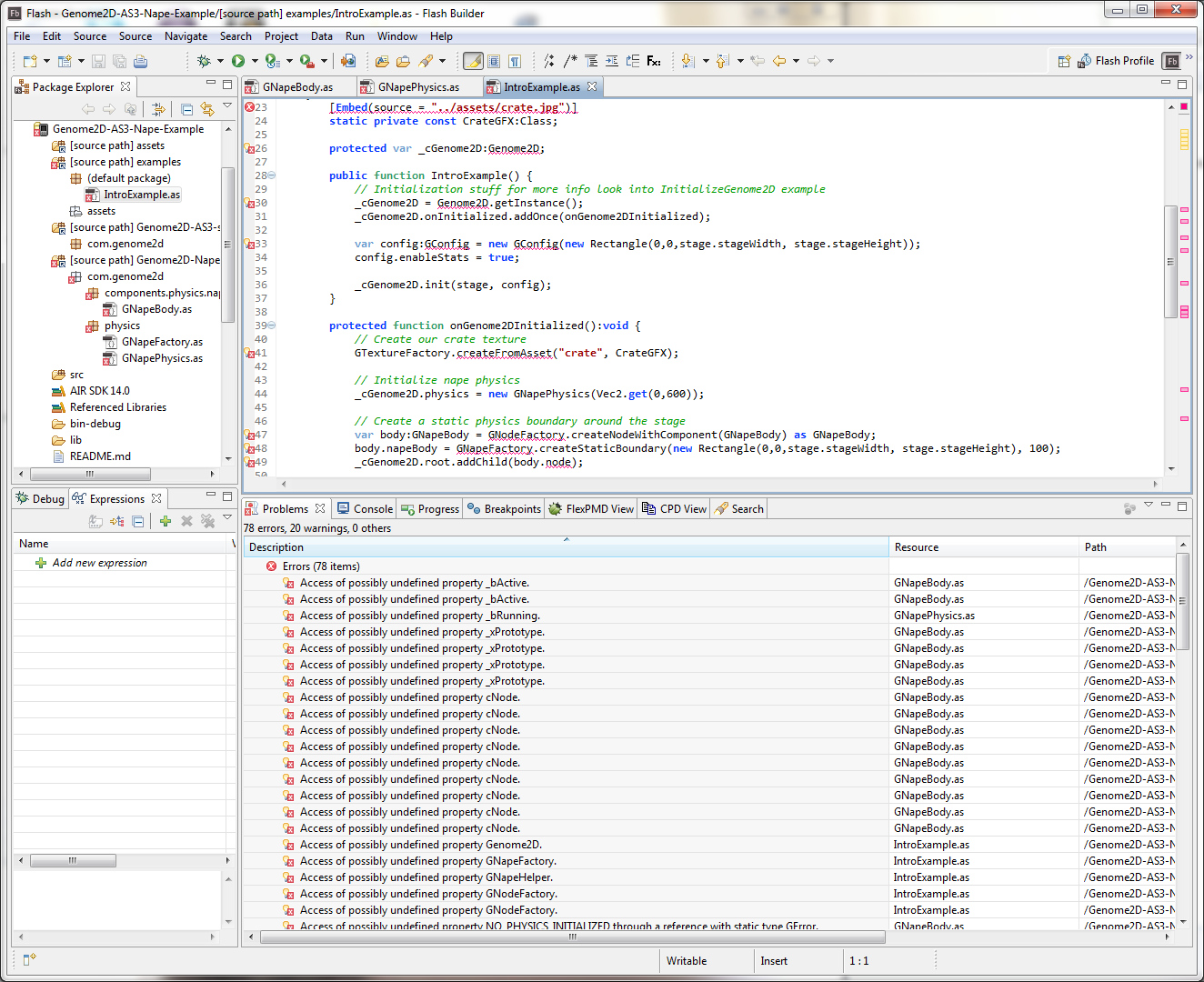
[AIR] Working Genome2D Nape Physics Example

I'm still curious about how Genome2D+Nape Physics perform via my iPhone5, The problem is https://github.com/pshtif/Genome2D-Nape is totally out date, but it's not a problem anymore after Genome2D open it source, then this magically happen ;)

You can try fix this yourself


(which actually fun)

Or just use my fixed here

because original Genome2D repo is comment out all physics related tho not sure why but in case it opensource, I've no mercy to fix it just for fun ;)

BTW : I won't pull request back yet because it too much hack and slash there, I'll wait for stable release to avoiding refracting conflict ;)

PS : Long time no code in  AS3 woooot!

[UPDATE]
just like i said it's kinda hack for learning and after asking for more detail on this via google group, turn out that that all physic stuff is get heavy refactoring there, nore detail via devcast here https://www.youtube.com/watch?v=XvH6g6h6JRQ i will revisit this again...not so soon ;)

Monday, July 7, 2014

[AIR] Workaround for aapt tool failed via AIR 14 SDK

That moments when...

when overly new AIR SDK normally we copy and paste to folder (old method)
C:\Program Files\Adobe\Adobe Flash Builder 4.7 (64 Bit)\sdks\4.6.0
and new one
C:\Program Files\Adobe\Adobe Flash Builder 4.7 (64 Bit)\eclipse\plugins\com.adobe.flash.compiler_4.7.0.349722\AIRSDK

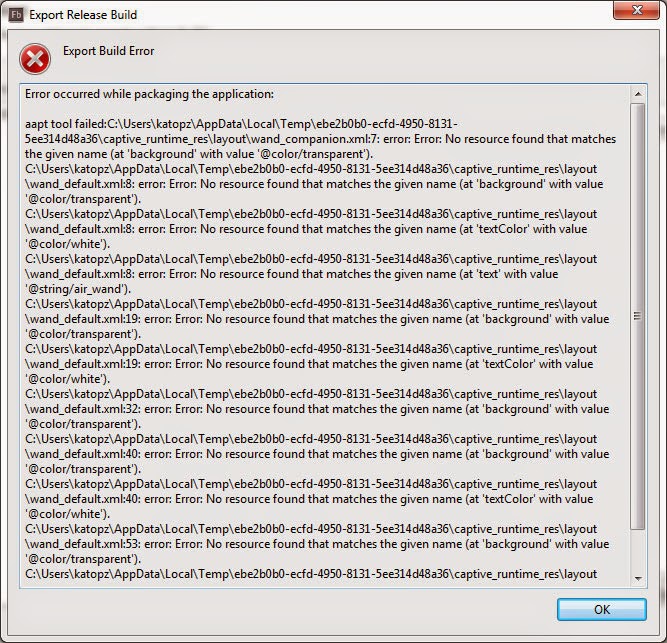
Tadaaa, You will get plenty of error via AIR 14 SDK beta

aapt tool failed:C:\Users\katopz\AppData\Local\Temp\40bfcf3c-9e8c-4a1f-86bc-18bb752c0d54\captive_runtime_res\layout\wand_companion.xml:7: error: Error: No resource found that matches the given name (at 'background' with value '@color/transparent').


More about this

Workaround

Delete anything in AIRSDK folder in my case is
C:\Program Files\Adobe\Adobe Flash Builder 4.7 (64 Bit)\eclipse\plugins\com.adobe.flash.compiler_4.7.0.349722\AIRSDK
An then completely extract everything from air-sdk.zip to that folder

Say again?

Delete old SDK before overlay like usual.
don't ask me why, it's just working ;p

Monday, May 12, 2014

[ANE] How to build and use x86 ANE AIR14


Know how to build/use normal armv7 ANE? Here's another step :)

How to build x86 ANE AIR14 via command line

  1. load AIR 14 here http://labs.adobe.com/technologies/flashruntimes/air/
  2. Read this : http://labsdownload.adobe.com/pub/labs/flashruntimes/shared/air14_flashplayer14_releasenotes.pdf
  3. modify old your old extension.xml


    tip : just copy whole old Android-ARM xml platform tag and change it name to Android-x86 should do the trick cause other remain same.
  4. and for ADT packaging command for ANE build script...

    adt -package -target ane Sample.ane extension.xml -swc Sample.swc -platform Android-ARM -C Android-ARM/ . -platform Android-x86 -C Android-x86/ .

Pitfalls and Hints

  1. even single dot is matter for packing command, just don't miss it.
  2. Android-ARM/ .  mean you will need Android-ARM folder and "." mean anything in that folder will be pack.
  3. you can try to unzip your ANE for fun
  4. in case you can unzip your old armv7 ANE, and it contain old .jar which really mean you can rebuild x86 support without original source just some guts (i don't try it yet, but it should work)
that's it!

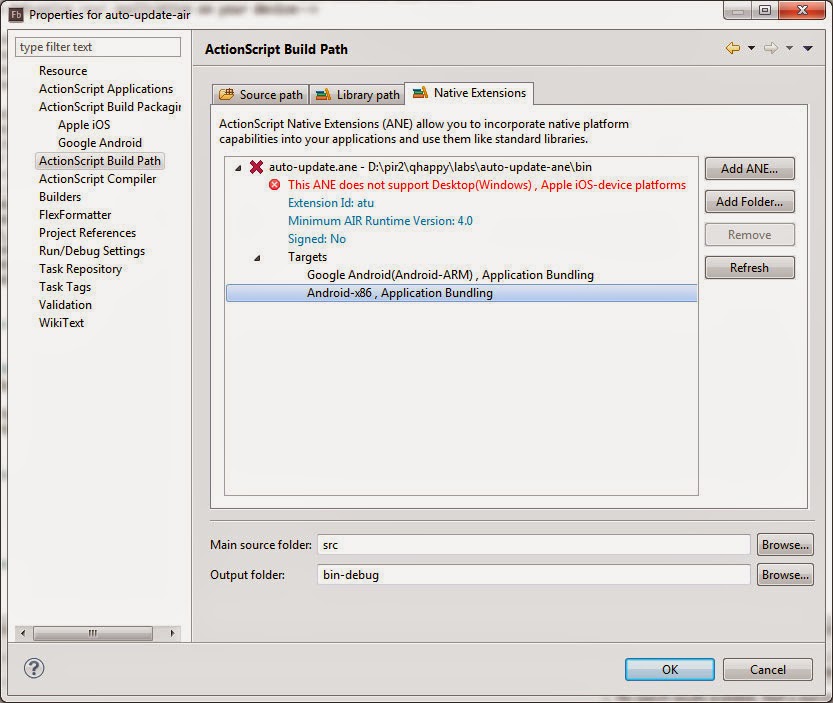
How to check if ANE is x86 compatible

just take a look tho ;p

How to use x86 architec via Flash Builder

for debug do add -arch=x86 via customize launch like after -listen like this (not anymore it's fixed then after May 14, 2014 you will need to add after -storetype )

 
but for run you will need to add before -storetype instead (because -listen not exist)

[UPDATE May 14, 2014] : Adobe fixed this https://github.com/PrimaryFeather/Starling-Framework/issues/539 and you will need to add -arch=x86 before -storetype from now on

[UPDATE May 16, 2014] : refer to...
  • 3759405 : [x86]Export Release Build from Flash Builder fails to run app on Android device when -arch parameter is used.

workaround is uncheck delete bin-release-temp folder and your apk will survived inside that temp folder... sound weird i know, just do it!

Like my blog and need more of this? Just download my app or feeding my cats here

Thanks! Meowww

Wednesday, April 9, 2014

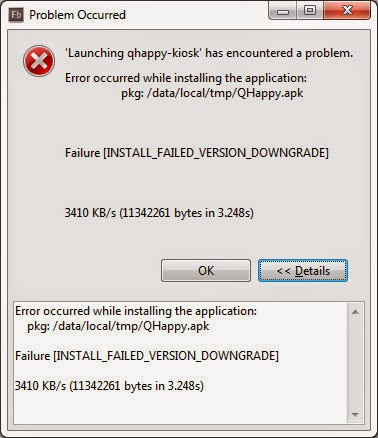
[FlashBuilder] Error occurred while installing the application

That moments when you get this error from Flash Builder 4.7...

Which said...
Error occurred while installing the application:
pkg: /data/local/tmp/QHappy.apk
Failure [INSTALL_FAILED_VERSION_DOWNGRADE]
3476 KB/s (11299944 bytes in 3.174s)
Don't panic! Just increase version number in your Main-app.xml...
1.0.0 
to something like
 1.1.0
And you're good to go! Or you can try close and delete installed application and try again.

That's it! :)

Sunday, March 30, 2014

[ANE] Daily pitfall, ANE and Worker don't get along in constructor

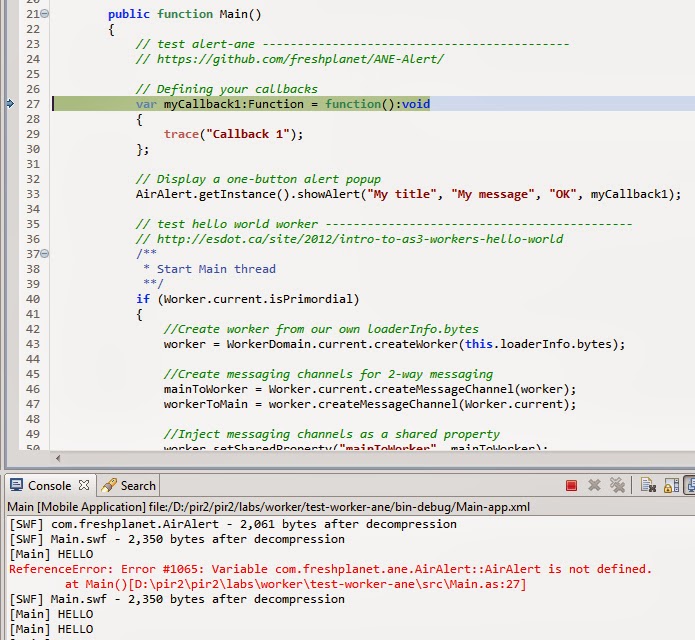
Quick note for ANE and Worker when you got...
ReferenceError: Error #1065: Variable ... is not defined. at Main()

To reproduce

  1. get any ANE e.g. https://github.com/freshplanet/ANE-Alert/
  2. get helloworld Worker e.g. http://esdot.ca/site/2012/intro-to-as3-workers-hello-world
  3. and put both in constructor like this https://gist.github.com/katopz/9873681

Work around


  • don't alloc ANE and Worker in constructor together, let worker do their job in their thread and then alloc ANE in Main thread.

That's it! back to work!

Thursday, January 16, 2014

[AIR] Adobe AIR4 10x faster packing IPA for real?

Happy new year guys! This is my first post and guess what I still posting about Flash/AIR stuff ;)
In case AIR still my weapon of choice for iOS/Android so let see the results!

Required

  1. AIR SDK : http://www.adobe.com/devnet/air/air-sdk-download.html
  2. Extract to AIR SDK path : http://sleepydesign.blogspot.com/2012/04/flash-swf-version-meaning.html
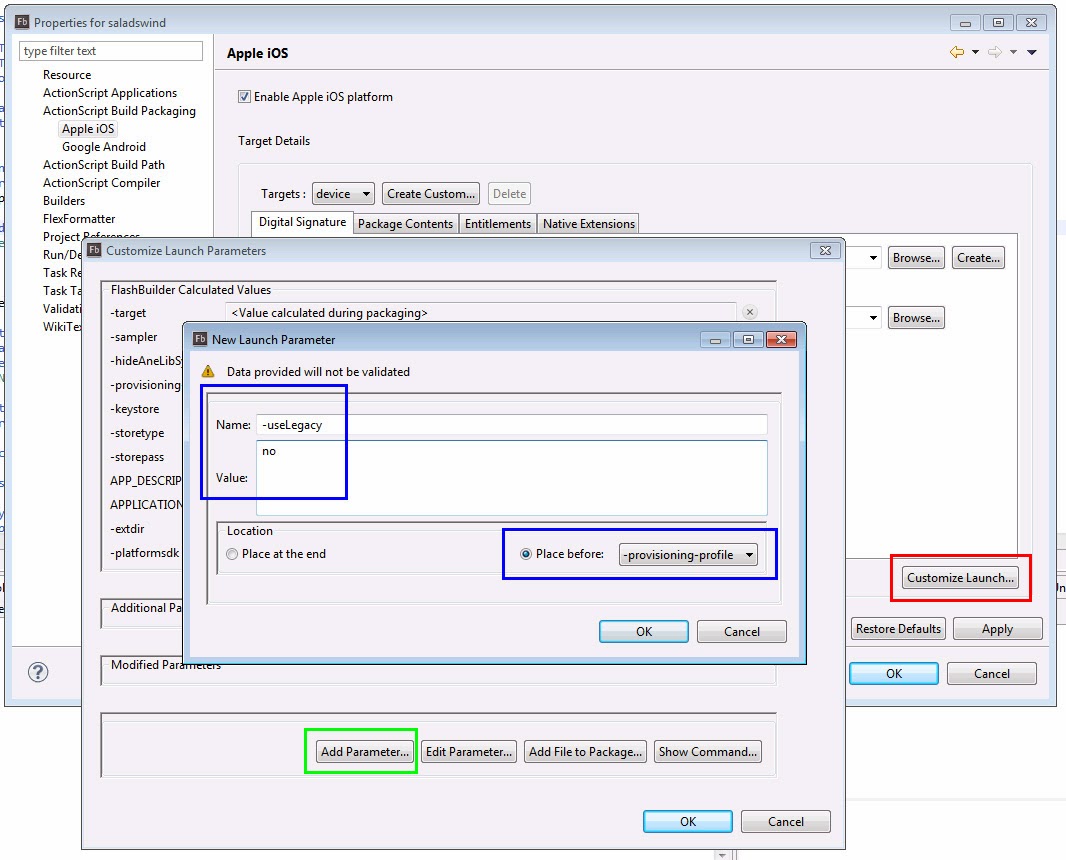
  3. use "-useLegacyAOT no" in the ADT command, before the signing options.

Just follow R->G->B step, nice eh? ;)

Result for release build with plenty of assets

  • Before update SDK AIR 3.8 = 7 minutes 8 seconds
  • After update SDK AIR4.0 = 4 minutes 27 seconds
  • After use "-useLegacyAOT no" in the ADT command = 35 seconds

OMG ~12x

All i can say is Adobe just give us a new year gift!
Hungry for more good news? try here : http://forums.adobe.com/message/6001351#6001351

Now I'm back to Xcode for my next app ;) Happy coding!


Update Some feedback via Twitter 

Update from Adobe Fixed Issues

  • 3739504 [External][Injection] Compiler change causes Flash Player to crash on load
  • Bug 3718581:compile-abc.exe crashes when package a nape physics game with -useLegacyAOT
  • Bug 3694360:-useLegacyAOT no causes logic failures in static function special scenario.
Flash Player Desktop: 13.0.0.199
AIR Runtime Desktop: 13.0.0.95

Hope it will be short list for bad news ;)

Sunday, November 17, 2013

[Flash] Robotlegs 2 Modular Signals Working Example

 http://www.robotlegs.org/
stolen img from http://www.robotlegs.org/

Yeah yeah i know party is mostly over just me and some dude hanging around and doing shit-chat about old time, but who care? in case client still hire me for mobile app that must be working on both iOS and Android, and sometime also Facebook app...in 2 week time frame...nothing beat Actionscript!

and for someone who still with me here's some juice left for our party!

https://github.com/katopz/robotlegs2-SignalCommandMap-example

this should be handy for learning curve form Robotlegs 1 which took me almost 1 year to learn and modify, but Robotlegs 2 only took me 1 day to accomplish. :D

No i'm not that smart ass, i'm just keep hack and slash to survive in this world and it just working :)

Actually i publish this github for a while but mostly forget to share it here due to heavy duty mess up with new iOS app (Xcode) that will be release soon (also with handy lazy code snippet for migrate as3 dude). Stay tune!

Happy coding! No matter Language it is! ;)


Saturday, August 17, 2013

[Flash] Flash Player and AIR "Irving" and "Jones" 2014

refer to http://www.adobe.com/devnet/flashplatform/whitepapers/roadmap.html
Adobe is planning its next two releases for late 2013 and early 2014. These releases continue to focus on premium video, gaming, security, and stability.
Some of the features being worked on for these releases include the following:
  • OSX Mavericks support for desktop Flash Player and AIR
  • Significant reduction in iOS packaging times
  • ActionScript concurrency for mobile (beta)
  • iOS 7 support (depends upon Apple schedule)
  • Support for Windows 8.1 PlayTo
  • Support for Windows 8.1 tab suspension improvements
  • Support for Windows Internet Explorer 11 back navigation caching
  • XXHDPI icon support for AIR Android
  • pkg installer bundle for Mac OSX (vs .dmg)
In short : Flash and AIR is not dead yet, someone (You know who) said that already dead (for a while).

Monday, June 10, 2013

[ANE] Use AIR to get USB device ID

by http://www.anymeme.org

That's long Time ago I did ANE HelloWorld for VC++ but didn't had free time to share yet. Suddenly I have some project that will need something like USB hardlock which won't allow program running if USB not plugged in...Challenge Accepted!

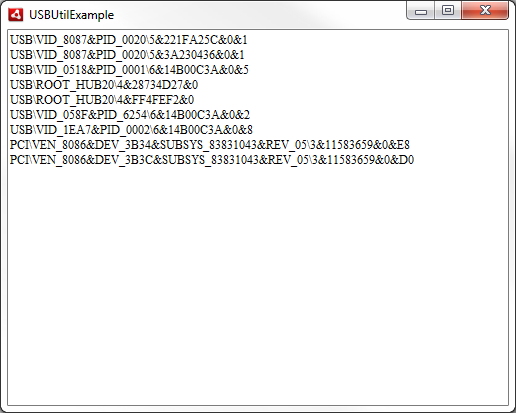
AIR with ANE to get USB unique ID which some interval check is a way to go for this case so here we go!

Resource

  1. ANEhttp://help.adobe.com/en_US/air/extensions/WS460ee381960520ad-866f9c112aa6e1ad46-8000.html
  2. Code : actually c# is look a lot easier but c++ is close to objective-c enough so i give it a try here is code i use https://gist.github.com/katopz/5734124
  3. Editor : Microsoft Visual Studio Express 2012 http://www.microsoft.com/visualstudio/eng/products/visual-studio-express-for-windows-8#product-express-windows
  4. Knowledge Base : some c++, some as3, some googling for .h,.lib and TCHAR fantasy conversion

Result

Tadaaa, USB\VID_xxxx&PID_yyyy\zzzz seem legit and unique enough for me. :D

Download

as3 example, ane build.bat, vc++ bla bla bla all here! https://github.com/katopz/ane-usb-util just Don't forget to feed my cat

[UPDATE ] Just realize that I already blog about USB ANE here while ago...so I just wasting my time here LOL, lucky me I love to code so it didn't hurt that much ;)

Happy coding! ;)

Saturday, February 2, 2013

[PostCat] How to get App Store Approval in 4 days

How to get approve to App Store in 4 days

After develop in free time for a year, change design 4 times (being client from hell myself), and ping pong reject for a month even nearly give up on approve process (which is working on my side by somehow not on Apple tester side)

I finally found out "the officially secret" that made my Pure as3 Flash AIR app  PostCat to Apple App Store  only in... JUST 4 DAYS! after submit binary (2 weeks is my best record before)

and just like usual i will share how can I get approve that quick but this time the secret will reveal after i my app reach 10,000 downloads , It's free and judge from unique visitors on my blog...you don't need to wait that long (finger cross)


Wait! What's this app is all about?

for more detail please see http://debokeh.com/postcat/ this also my first seriously HTML CSS responsive thingy in decade. so don't expect that much cause i'm Flashy dude ;)

Why I have to download again?

  1. You want to know... :  how to get approved in 4 days :)
  2. It's use Sprite to perform list view : yes without any Stage3D so if you want to know Sprite doing in real life application, try it now cause it will be replace by Stage3D in some version ahead (not because it too slow but i want to compare with Stage3D)
  3. It's use P2P : then if you really want to know is P2P gonna work on iOS and/or via personal hotspot sharing, you must try (Apple tester get P2P blocked i think so my app get reject, this also include in "secret" that how can i get pass on this too)
  4. You are Android lover : Oh! yes Android version will be release right after 10,000 downloads, also some ANE Java source code will be shared here too.
  5. You want to try ANE : that's list here
  6. It's use my design : If you want to know how well can i design, you must try it (cute!)
  7. You love me : and also love my job, download number can't  feed my cats but will keep pushing me to do something more.

Why don't you just tell us like usual?

I usually sharing things and expected some donation to feed my cats but bad news is i get 0$ so far (poor cats), well download is free anyway so don't be hesitate to give it a try.

Think again, May be i'll die with this secret...because target download number never reach, how cool is that LOL ;D



Saturday, December 8, 2012

[ANE] Pay It Forward, More Free ANE!

I using Free ANE and also learning from their code. So it's time to payback! I will list my public (some is remain private for my client) ANE stuff here.


Public and open source

Private use 

  • ane-parse-com : ANE for Parse.com SDK including Push Notification in Java (iOS didn't need ANE), Anyone need this please leave comment below or email me katopz(at)gmail.com :)

For other free ANE try here


PS : If you need more ANE or Android version, Don't forget to feed my cat

Wednesday, November 14, 2012

[AIR] Post-mortem iOS development via PC


Adobe AIR is great way to build application on iOS and apply to Android in a blink (yes, you still need sometime to adjust screen size and else), and also PC is cheapest way to build the app, let see what went wrong while developing 'til publishing to store.

Possible to develop iOS on PC?

Yes! here's your choices.
  1. VMWare // geeky find proper installation step (try google for it),  slow as hell, but fine to use for create certificate and upload binary ipa via Application Loader.
  2. UniBeast // super geek installation, you can break your computer in every step, but when it's done it just working just like pricy Mac.

Can app really be done with AIR?

After distribute plenty of my clients app...I've to say yes! but keep in mind that...
  1. Must keep 60fps steady on desktop version as possible, you will get not much trouble when deploy to device.
  2. Must use Flash Builder profiler and/or Monocle to find what cause your app hang up.
  3. Must build and test via real device as much possible.
  4. ANE is best way to deal with anything that AIR can't do. only cons for ANE is fragmentation of iOS version and some ANE still require iOS SDK while build.

Do we need certificate?

You obviously need it for distribution (yes, you can hack for development process certification, but don't ask me how, just paid for it dude) In my case is super fancy, my first development certificate is create via PC command line,  distribution certificate via VMWare Lion and finally import both to UniBeast PC Mountain Lion, Don't follow me on this one ;p
  1. To get some just follow this guide : http://help.adobe.com/en_US/as3/iphone/WS789ea67d3e73a8b2-240138de1243a7725e7-8000.html
  2. Try understand work flow : http://developer.apple.com/library/ios/#documentation/Xcode/Conceptual/ios_development_workflow/10-Configuring_Development_and_Distribution_Assets/identities_and_devices.html
  3. Must back up your certificate, in some cloud to be save. // for PC .p12 with password should be enough, in Mac better export all at once save it somewhere. 
  4. If your client need to publish as their company name do ask them to provide distribute certificated.

Can we do In-app purchase?

Sure! for now you need ANE for that, good news is it's free! but...
  1. Must not use Jail broken device for testing. // i think this is undoc ;p
  2. Must include products before submit binary via App detail page. // this will waste your time for a month and also chance to get money if you miss this step because you have reupload binary and queue for review all over again! if it not appear then just upload binary -> reject it yourself -> edit button will appear behind In-app purchase topic -> check what product you will include via check box, yeah all sound weird but just work and don't ask me why just do it!
  3. Must remove any transaction in all case. // or you will get infinite loop yelling for "You've already purchased this but it hasn't been downloaded"
  4. Consumable product won't get reject while create product but Non-Consumable product will get reject if you binary didn't upload yet.
  5. Your product can get reject separately from Application reject, review process seem to be separated BTW.

My application rejected!

do/don't :  https://developer.apple.com/appstore/resources/approval/guidelines.html
  1. Must upload binary within 150 days after named your application, if not you will then be available for another developer to use.
  2. Must have offline mode for tester, especially if your app need Facebook, in short  make any authentication as optional.
  3. If you target iPhone, your app must working via iPad3, iPad4 too! // woot! in my case my client didn't paid for iPad version but i still need to make it work or get reject!
  4. Must use developer name not client name. // my client didn't provide certificate for distribution, so i use client company name instead of my company then it conflicted and get reject.
  5. Must not refer to Android in all case. // even your app can use and/or communicate between iOS and Android, you just can't say it...wooooot!
  6. Comment on Resolution Center will get answer back after 3 days pass and usually nothing but kick you to Appeal page. // in my case i just can't wait for appeal process that i never know how long it gonna take, so i just fix #3 and re submit new binary
  7. Binary Review process took around 14 days usually, update version is vary 1 day for fastest record, and FYI that they also work weekend. // My app get reject on Sunday lol
  8. AIR 3.5 + Default-568h@2x.png 1136x640 will trigger iPhone5 compatible and you will need screenshot for that.

Notes

  1. Your app will list via iPad even you target iPhone.
  2. Your app will appear in search result around 24hrs after ready for sale state.
  3. Don't cry and/or angry when you get rejected, It didn't help and you will get use to it soon. ;)

Tips

  1. It's easier to take screen shot via Mac by Xcode via Organizer window.
  2. To track user behavior do try use https://developers.google.com/analytics/devguides/collection/other/flashTrackingSetupFlash#useAnalyticsLibrary
  3. To transfer file to/from device to/from PC/Mac i use iFunbox
  4. For free cloud hosting perfect for testing i use hostzilla
  5. For free private SVN hosting i use ProjectLocker
  6. For cats lover do try http://instagram.com/katopz

FYI : I will add some screenshot for each topic really later #fingercross ;p

Sunday, November 11, 2012

[Xcode] Summon UniBeast on PC for Xcode


I'll post my journey through Mac via PC here, you can expected more update later ;)

What's PC spec?

I install to my good old PC instead of buying new one (yes i'm poor) which is...
  • ASUS P7P55D PRO Intel P55 Express Chipset Mainboard for Intel LGA 1156
  • Intel Core i5-650 3.2 GHz  [LGA 1156]
  • G.SKILL F3-12800CL9T NQ Series 3GB (3x 1GB) DDR3-1600 240-Pin CL9 RAM
  • EVGA GTS250 PCIExpressx16 Gen 2 1G GDDR3 // old card but still fast enough
  • ST3750330AS 750MB // yes, old HD perfect for testing ;)
  • LG E2360 - DVI
  • LG W2261- HDMI // won't work, freeze when plug it in ;(

How?

  1. Try install UniBeast : http://www.tonymacx86.com/61-unibeast-install-os-x-mountain-lion-any-supported-intel-based-pc.html // super geek installation, you can break your computer in every step, but when it's done it's just working like Mac
  2. If it not work, try EasyBeast only and don't install any driver yet. // i've have to use this method with out UserDSDT and only EasyBeast checked and reboot then try add lnx2mac's realtek rtl81xx ethernet later.

Any suggestion?

  1. Unplug as any USB possible.
  2. Unplug any HD as possible.
  3. My audio need this fix : http://www.tonymacx86.com/audio/63663-asus-p7p55d-enable-via-vt1828s-sound-10-8-a.html
  4. after switching from IDE to AHCI you need to reboot it twice to let bios scan hard disk all over again and also make sure boot drive is set.

Tune your Mac like PC

  1. make Mac keyboard behavior as PC : http://doublecommand.sourceforge.net
  2. invert scroll wheel in your setting // mouse rules!
  3. remap Windows key (Command key) to CTRL key and you can copy/paste like before.
  4. remap Home End behaviour like Windows : http://www.starryhope.com/mac-os-x-home-and-end-keys/
  5. to switch language with grave accent : https://pqrs.org/macosx/keyremap4macbook/
  6. stupid copy/paste merge...try alt while drag/drop or ForkLift
  7. to batch like DOS (foo.bat) in Mac is create file "foo.sh" begin with "#!/bin/bash" follow with your cmd e.g. echo "Hello World!" it will look like...

    #!/bin/bash
    echo "Hello World"

    save and then "chmod u+x foo.sh" and run it with "sh foo.sh" // easier in Windows!
  8. view all hidden file open terminal and...
    
    defaults write com.apple.Finder AppleShowAllFiles YES
    
    then alt+right click at Finder then select Relaunch 

Pro?

  1. cheaper than buy new Mac. // poor me
  2. faster than VMWare. // bye bye VMWare

Cons?

  1. Dual monitor HDMI will freeze. // something todo with my GTS250 driver...
  2. You Windows 7 MBR can be broken after try switching where to boot between OS. // i did have to reinstall Windows 7 ;p
Now install XCODE and  have fun developing! :)

Thursday, October 18, 2012

[AIR] Monetize mobile applications


this will contain how developer (yes me and you) can monetize our application, let’s start which some link after googling and I will review it again after use.(wish me luck)


FYI : iAd ANE fail to load via iOS6 and buggy randomly misplace show up, so I’ve to find another solution.

FYI2 : admob for web is deprecated, it change to AdSense hand which not allow on mobile app which mean you just can’t use StageWebView to show AdSense.
  1. https://www.adwhirl.com/

    by admob by Google hmm sound interesting in case it has unofficial SDK for AS3 and also support iAd  and other network

    Result : SDK never work for me, I will wait for ANE then, let’s try next one.

  2. http://www.placeplay.com/

    also support AIR ANE, will try if adwhirl fail me then

    Result : I still wait for app ID to test, and they not reply me yet…next!
    [UPDATE#1] placeplay guys just response my email, ask me for my app name, still wait…
    [UPDATE#2] get email response but too late for me (have to submit binary to app store), will try include it next build then.
  3. http://www.revmob.com/

    plenty of SDK include AIR ANE here http://sdk.revmob.com/

    Result : let’s build and…

    Error occurred while packaging the application:
    Undefined symbols for architecture armv7:
    "_OBJC_CLASS_$_SKStoreProductViewController", referenced from:
    objc-class-ref in C:\\Users\\katopz\\AppData\\Local\\Temp\\44fc5e85-5e7d-447e-8269-e590f755951e\\libcom.revmob.airextension.a(RevMobStoreController.o)
    "_SKStoreProductParameterITunesItemIdentifier", referenced from:
    -[RevMobStoreController openStoreWithITunesItemId:] in C:\\Users\\katopz\\AppData\\Local\\Temp\\44fc5e85-5e7d-447e-8269-e590f755951e\\libcom.revmob.airextension.a(RevMobStoreController.o)
    ld: symbol(s) not found for architecture armv7
    Compilation failed while executing : ld64
    [UPDATE#1] revmob guys tell me that I also need iOS SDK to build, so…downloading…
    [UPDATE#2] refer to http://help.adobe.com/en_US/flashbuilder/using/WSe4e4b720da9dedb5-2e7310a1136ab7c1811-8000.html#WSe4e4b720da9dedb5-2e7310a1136ab7c1811-7ffe said

    Support for iOS5 native extensions

    To package native extensions that use iOS5 SDK features, the AIR Developer Tool (ADT) requires the location of the iOS5 SDK.
    On Mac OS, Flash Builder lets you select the location of the iOS5 SDK using the Package Settings dialog. After you select the location of the iOS SDK, the selected location is passed through the -platformsdk ADT command.
    Note: This functionality is currently not supported on Windows.


    which mean I just can’t use it…farewell then
     

  4. you tell me!
PS : my current solution is if iAd ANE fail –> load AdMob ANE
[PS#2] AdMob ANE fail to build with NativeMailExtension and iAd ANE won’t work via iOS6 then ny current solution is only admob-native-extension
Actually this shouldn’t be so hard…but because of iOS is keep update itself then old ANE will fail depend on it luck. so you can expected more update from me here ;p

Sunday, September 16, 2012

[AIR] Just another Adobe AIR Kids Games on App Store!

About time for self promo ;) here’s first kids game via iPad (made with Adobe Flash) from my company now on App Store!

Development details

  • Build with Flash Builder 4.7, AIR 3.4
  • Using plenty of library eg. robotlegs-modular-signals
  • Using ANE iAds and in App purchase (see here for working and free ANE list)


Don’t even think… Just download try! ;D

Not bad for first try don’t you think so? ;)

Friday, July 20, 2012

[ANE] Free AIR Native Extensions Collection


I’ll collect about free ANE stuff here (only some of them is already test and working) feel free to bookmark for later use ;)

UPDATE : 2015/02/01 Apple required ANE 64-bit, see below how to survives ;)

Adobe

  1. Adobe AIR Developer Center : Getting started / Reference and documentation / Tutorials and articles, also some free ane listed there
  2. Flash Runtime iOS Team : Great develop tip eg. Commonly faced issues while developing Native Extensions for iOS
  3. iOS native extensions (ANEs) included

    Game Center : Leaderboards, achievements, need to challenge friends? Integrate with the Apple iOS Game Center.

    StageAd : Reach a whole new audience and integrate with the iAd network.

    Social : Various social networks such as Facebook, Twitter, SinaWeibo

    In-App Purchase : Helps you increase your revenue and enable purchases directly within your game.

    Beta Testing : Looking for solid, on-the-fly beta testing? Iterate faster with TestFlight integration.

    UPDATE : 2015/03/02 Adobe Gaming SDK ANE’s – Universal 64-bit 
katopz (Yes! Me!)
  1. ane-device-info-util : ANE 64-bit for get some information from iOS device.
  2. ane-device-file-util : ANE 64-bit for open file with registered application on iOS.
  3. ane-photosalbum : ANE 64-bit  for save image as JPEG or PNG to iOS CameraRoll (why bother use this instead of CameraRoll.addBitmapData? please see this Error #3004: Insufficient file space.  bug for more detail)
  4. ane-usb-util : ANE that will get all USB ID.

Amazon Mobile App SDK

  1. https://developer.amazon.com/sdk.html

 Freshplanet

  1. ANE-Facebook : Air Native Extension (iOS and Android) for the Facebook mobile SDK
  2. ANE-Network-Info : Air Native Extension (iOS and Android) for getting Network Information
  3. ANE-In-App-Purchase : Air Native Extension (iOS and Android) for In App Purchase
  4. ANE-Push-Notification : Air Native Extension (iOS and Android) for Push Notification
  5. ANE-Background-Music : Air Native Extension (iOS and Android) for managing background music

 StickSports

  1. ANE-Flurry-Analytics : Air native extension for Flurry Analytics (iOS and Android)
  2. ANE-Can-Open-URL : Air native extension for iOS to detect whether an app is installed to handle a specific URL scheme.
  3. ANE-In-App-Purchase : Air native extension for integration with Apple's in-app purchase
  4. ANE-Game-Center : Air native extension for integration with Apple's game center
  5. ANE-Keychain : Air Native Extension for iOS to read and write data from and to the Keychain
  6. ANE-Silent-Switch : Air native extension for iOS to mute sounds if the hardware silent switch is on. (no need anymore via AIR3.4 @see Silencing audio on iOS with Ambient Audio Playback Mode )
  7. Social-ANE : Air native extension or sending messages to social networks on iOS. It utilizes the social functionality added in iOS6. e.g. Facebook, Twitter, Sina Weibo

 memeller (PaweÅ‚ Meller)

  1. iOSNativeUtilities : Set of native utilities (in form of Adobe Air Native Extension) for iOS: currently unzip, access to settings bundle and nslog
  2. ContactEditor : Native Extension for iOS and Android enabling AddressBook access
  3. vfrReaderNativeExtension : Native Extension for Adobe AIR for iOS that uses vfr Reader (https://github.com/vfr/Reader) to show pdf files
  4. ActionSheetAne : ActionSheet Native Extension for iOS

Michael Barr

  1. flashbuilder-ane-address-book : FlashBuilder ANE Save to Address Book for iOS
  2. flashbuilder-ane-alert : FlashBuilder ANE Native Alerts for iOS / Toast Alerts for Android
  3. flashbuilder-ane-ios-data-storage-do-not-backup-icloud : FlashBuilder ANE iOS Data Storage
  4. flashbuilder-ane-local-notification-set-app-icon-badge-number : FlashBuilder ANE Local notification setting App icon badge number
  5. flashbuilder-ane-save-date-as-calendar-events : FlashBuilder ANE Save date as Calendar Event on iOS

 jlopez

  1. ane-facebook : Facebook iOS ANE
  2. ane-storekit : Storekit iOS ANE
  3. ane-kontagent : Kontagent iOS ANE

jampot

  1. ANE Native Alerts (iOS & Android) : Adobe Native Extension Native Alerts for iOS / Toast Alerts for Android
  2. ANE Save Contact to Address Book (iOS) : Adobe Native Extension Save to Address Book
  3. ANE Save date as Calendar Event (iOS) : Adobe Native Extension Save date as Calendar Event on iOS
  4. ANE Local Notification Set App Icon Badge Number (iOS) : Adobe Native Extension Local notification setting App icon badge number
  5. ANE Data Storage ‘Do Not Backup’ to iCloud on iOS 5.0.1 (iOS) : Adobe Native Extension FlashBuilder ANE iOS Data Storage Allows you to set new iCloud 'do not backup' attribute on iOS 5.0.1

DiaDraw

  1. diadraw-air-camera-native-extension : This extension allows AIR applications to use the camera with control over autofocus, autoexposure, etc. - functionality, which is not available in the AIR SDK.
  2. diadraw-air-dropbox-native-extension-example : Dropbox ANE
  3. diadraw-air-email-native-extension-example : The extension enables you to use the mail composer on iOS devices and send e-mail with attachments.

Random clever dude

  1. in-app-purchase-air-ios : A sample Actionscript Native Extension for In-App Purchase capabilities on iOS. This will allow any AIR for iOS application to use the capabilities of In-App Purchases provided by iOS SDK. (tested working)
  2. iad-air-ios : A sample Actionscript Native Extension for iAds capabilities on iOS. This will allow any AIR for iOS application to use the iAds provided by iOS SDK. (tested working iOS5 stop working on iOS6)
  3. ANE-Game-Center : Air native extension for integration with Apple's game center
  4. xcode-template-ane : XCode 4 project template for creating AIR native extensions (ANE) for iOS
  5. AIR-OpenCV-Extension : Native Extension for Adobe AIR, exposing OpenCV API's
  6. FREPenTablet : This native extension allows you to read pressure sensitivity data from a pen tablet. It’s only been tested on Windows 7 with a Wacom Intuos 4. I’ll go through the build steps in the same format as last time.
  7. Read phone number from device : Android
  8. NativeMailExtension : (tested working)
  9. NativeAlert : Native Extension for Adobe Air enable mobile native dialog box (IOS Andoid) - Toast message, Text Input dialog, Progress dialog, Alert dialog, multi single choice dialog +System Preferences (tested working)
  10. NativeAlert : Native Extension for Adobe Air mobile to enable iOS Native Alerts with user interactions
  11. NativeAPNService : Apple Push Notification Service support for Adobe AIR on iOS
  12. AIR Maps Native Extension : provides the support for using the native mapping component in your Adobe AIR application.
  13. CaptureDevice : Adobe Air Native Extension for video capturing from cameras (tested working)
  14. ANEUnRar : Adobe Air Native Extension to Obj-C UnRar Lib (thx Pedro Casaubon)
  15. as3-arduino-connector : Connecting Arduino Prototyping board to Adobe AIR through an AIR Native Extension. Available for Windows and MacOSX.
  16. ServerSocketANE : Adobe Air Native Extension (ANE) for ServerSocket on mobile platforms
  17. Android-AIR-Extensions : This project provides some simple but useful AIR 3.0 NativeExtension for Android platform.
  18. GCM extension : (Google Cloud Messaging) which is a free service provided by Google that allows messages to be pushed to devices of your app users. (thx afterisktech)
  19. air-native-extension-euler-gyroscope : A native extension to get euler angles from the iDevice's gyroscope
  20. Admob-ANE : Adobe AIR Native Extension (ANE) which works on iOS and on Android (tested working but will conflict with NativeMailExtension)
  21. Flurry-ANE : Flurry analytics packaged as Adobe AIR native extension. ANE is compatible with Android and iOS
  22. box2d_ane : Box2D Air Native Extension
  23. qr-zbar-ane : QR Scanner uses ZBar iPhone library.
  24. lilili87222 / admob-for-flash : admob ane lib for flash iOS app and flash android app.it enable air application load native Advertising (need AdSupport framework while build = won’t work on Windows) UPDATE : see warning in comment below or here
  25. flash-for-mobile : admob ane for android
  26. admob-native-extension : admob ane (non English = poor doc, tested working no conflicted)
  27. new-actionscript-native-extension-speech-recognition : an API to launch the default speech recognition UI and capture voice input. also speech-recognition-ane-source
  28. air-hid-usb : AIR native extension, wrapper for HIDAPI
  29. ANE-Localytics : Localytics analytics for mobile Adobe AIR applications (iOS & Android)
  30. CanonEOS_LIB : An Adobe Native Extension to control a DSLR Canon camera (thx Angel Ernesto Anton Yebra)
  31. appirater-ane : Adobe AIR ANE for using Appirater in your iOS projects.
  32. nativetwitter-ane : Adobe AIR ANE for iOS devices that allows developers to use the native Twitter framework added in iOS 5.0. (tested working)
  33. rivella50/ANE-CameraRoll : Adobe Air Native Extension (ANE) for better support of mobile device’s CameraRoll e.g. thumbnail, photo info
  34. Admob Native Extension for Adobe Air : AdMob Mobile monetization platform with Adobe Air. The Extension support Android Platform and iOS Platform.  (not test yet but look promising) (thx Code Alchemy) 
  35. ChunkEMail : AIR Native Extension designed to use the Android email composer to send emails. (thx Nils Thingvall)
  36. GeoCapabilities : AIR Native Extension designed to expose more granular information on whether GPS is enabled or disabled. (thx Nils Thingvall)
  37. Facebook Single Sign-On for Android : name said it (thx afterisktech)
  38. Admob Native Extension 2014 : Admob Native Extension for Adobe Air for Google play from 1 Aug. 2014 deprecated, support Android: Google Play services ver. 5.0, iOS: Admob SDK 6.11.1 (Admob SDK 6.8.0 in iOS 4.3 compatible version) UPDATE : see warning in comment below or here
  39. you tell me!
And A lot more suggestion at comments below which surely miss some there sry!
Still have no luck? try here (not free, developer still need to eat anyway)

No money but brain? build your own!

Need 64-bit?


more to come…suggestion comment is more than welcome! :)