Showing posts with label Xcode. Show all posts

Thursday, January 8, 2015

[Cucumber] Hello Calabash Swift iOS

Behavior-driven development (BDD) Why?

  • why not?
  • it's fun
  • why not!?

Required

  1. http://brew.sh/
  2. $ brew install ruby
  3. $ gem install calabash-cucumber --no-ri --no-rdoc
  4. $ sudo xcode-select -switch /Applications/Xcode.app/Contents/Developer
  5. $ sudo gem install bundler

Install


  1. $ git clone https://github.com/codingricky/todoSwift
  2. In Xcode : open SingleTodo.xcodeproj and set Build Active Architecture Only = No
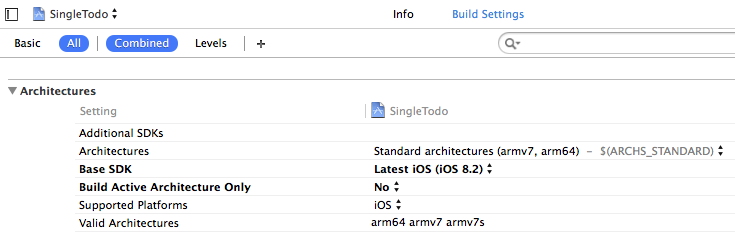
  3. fix error as Xcode suggest, build and run once to make sure it work properly
  4. $ cd todoSwift
  5. $ calabash-ios setup
  6. if you get
    ._SingleTodo.xcodeproj
    We don't yet support this. Please setup calabash manually.
    do try delete it by...

    $ rm ._SingleTodo.xcodeproj

  7. In Xcode : switch to SingleTodo-cal scheme
  8. $ calabash-ios gen
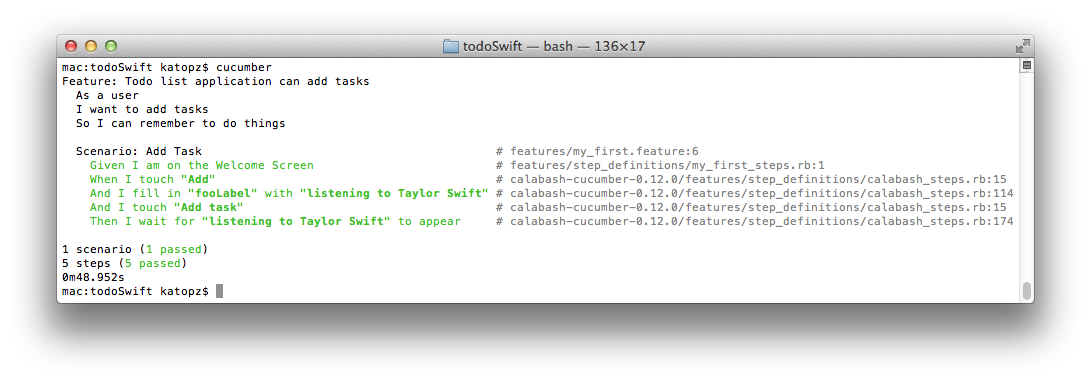
  9. $ cucumber

Trouble?

  1. cry
  2. make sure all update https://github.com/calabash/calabash-ios/wiki/B1-Updating-your-Calabash-iOS-version#updating-calabash-ios and close then reopen terminal  
  3. try https://github.com/calabash/calabash-ios/wiki/Hot-Topics#1-when-targeting-a-simulator-the-app-launches-then-quits-several-times-in-rapid-succession
  4. Time out waiting for UIAutomation run-loop? try this

    $ DEVICE_TARGET="iPhone 6 (8.1 Simulator)" cucumber

  5. Unable to unzip calabash.framework.zip? try here for temporary workaround https://github.com/calabash/calabash-ios/issues/682

    ----------Info----------
    error:  cannot delete old ./calabash.framework/Headers
    error:  cannot delete old ./calabash.framework/Resources
    error:  cannot delete old ./calabash.framework/Versions/0.12.0
    error:  cannot delete old ./calabash.framework/Versions/Current
    caution: excluded filename not matched:  __MACOSX/*
    caution: excluded filename not matched:  calabash.framework/.DS_Store
    
    ----------Error----------
    Unable to unzip file: /usr/local/lib/ruby/gems/2.2.0/gems/calabash-cucumber-0.12.1/bin/../staticlib/calabash.framework.zip
    You must install manually.
    ---------------------------
  6. yelling for permission? gimme sudo!
  7. $ sudo chown -R replace_this_with_your_name /usr/local/lib/ruby/gems/2.2.0

Cached?

  1. $ calabash-ios sim reset

Next?

  1. Feature: Todo list application can add tasks
      As a user
      I want to add tasks
      So I can remember to do things
    Scenario: Add Task
      Given I am on the Welcome Screen
      When I touch "Add"
      Then I enter "listening to Taylor Swift" into input field number 1
      And I touch "Add task"
      Then I wait for "listening to Taylor Swift" to appear

Reference

Note to self

Happy Testing! :D


Monday, February 10, 2014

[Xcode] Invalid Signature, Invalid Binary Nightmare!


At first I think I will add this to postmortem but it should be a huge list there lol, so i think i better separated this case here. It happen when you pass validation via Xcode and trying to distribute to app store...


Then shit happen when you got email eventually after submit your app to app store
Dear developer,
We have discovered one or more issues with your recent delivery for "Meaning". To process your delivery, the following issues must be corrected:
Invalid Signature - Make sure you have signed your application with a distribution certificate, not an ad hoc certificate or a development certificate. Verify that the code signing settings in Xcode are correct at the target level (which override any values at the project level). Additionally, make sure the bundle you are uploading was built using a Release target in Xcode, not a Simulator target. If you are certain your code signing settings are correct, choose "Clean All" in Xcode, delete the "build" directory in the Finder, and rebuild your release target.
Once these issues have been corrected, go to the Version Details page and click "Ready to Upload Binary." Continue through the submission process until the app status is "Waiting for Upload." You can then deliver the corrected binary.
Regards,
The App Store team
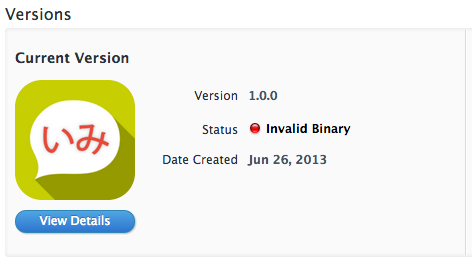
And appear "Invalid Binary" like this on itune connect...

Case # 1 : Invalid Signature

After delete/revoke all developer/distribute 10 times even start from scratch again and again, nothing work for me tho, i shouldn't that stupid and even i let Xcode is picking up signing certification itself but it still didn't get through so it shouldn't be the case.

Case # 2 : Invalid Binary

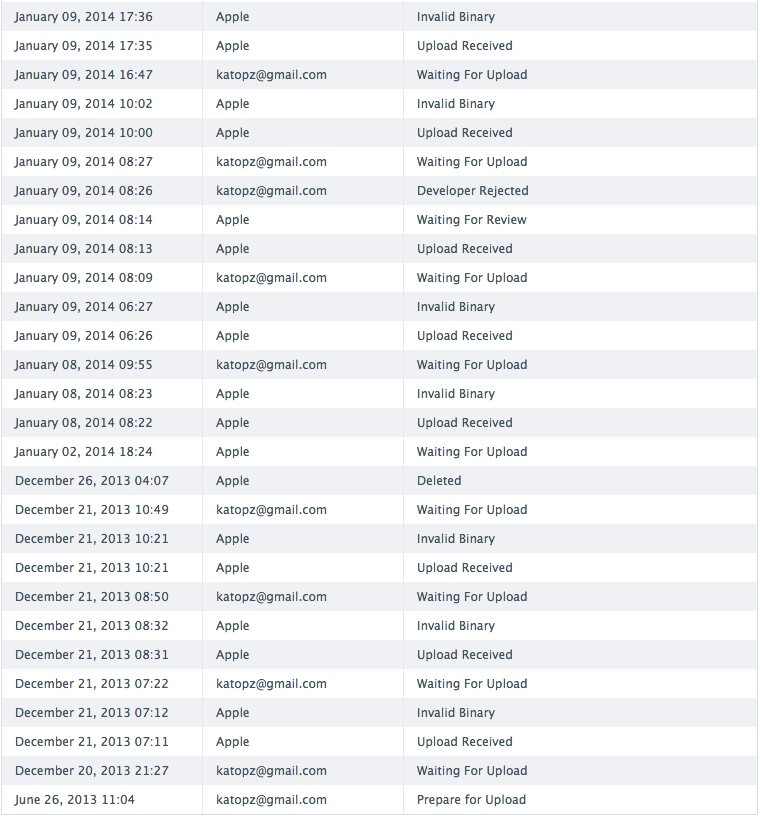
If you google for this mess you will plenty of solution on stackoverflow which none of them is working and here's (some of) my 21 times trying for a 2 months (each time required an hour upload time)...

And even worst my app name will expire at period of week that app store planning to close (21 Dec.), which mean if i can't upload it in time. My app name will be hand over to someone and i never get it back! and guess what? App store keep rejecting my app til last minute of that time and i did lost my app name (26 Dec.)

But after I try email and beg apple for mercy, they just gave me a 2nd chance to upload because it's not all my false and i did submit binary. then on 2 Jan. i can upload again.

(Nearly)All problem has solution :)

Now you should want to know what my problem is! The secret just reveal a second ago so i'm totally itchy to write it down...TADA...my problem for causing invalid binary is ExFAT which i use to write project in this ExFat drive so i can read/write assets between Windows and Mac (i'm using both OS on same PC), grhhhh here's conclusion...

Problem : Archiving and then distribute application with Xcode 5 to App Store on ExFAT drive will cause you Invalid Binary

Solution : Move project to normal Mac OS formatted drive and archive/distribute from that.

All this mess take me Dec 2013 -> Feb 2014 to figure this out and nearly give up while trying, Just hope this will save someone time.(And yes you can click any ads on my blog to cheers me up lol)

Happy Coding!

Saturday, July 6, 2013

[Xcode] Newbie Pitfall

As an former ActionScript coder who's try to have fun with Xcode. I love to jump on to some example and get dirty. The fancy part of this fun is many example out there is not working properly due to plenty of deprecated and version conflicted.

Lucky us, we have google and stack overflow to help us get through this mess, but many time I realize that I've to try many random thread to get working answer (some is in random comment and not mark as an answer!) so I think I better collect my pitfall here for later reference.

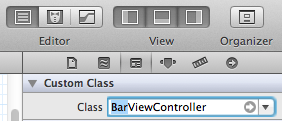
Problem : Unknown class MyClass in Interface Builder file.
Cause : rename FooViewController -> BarViewController
Solution : click Foo.xib -> Click at Identity Inspector -> make sure it has correct new name

Problem : clang: warning: argument unused during compilation: '-stdc++'
Cause : Tesseract...

Problem : Xcode hangs "Attaching to (app name)" and throw "invalid host string: 'localhost'" when try to run and connect to simulator
Cause : XAMPP mess with hosts file and Xcode doesn't seem to like it.
Solution : sudo nano /private/etc/hosts and make sure it look like this...
127.0.0.1 localhost 255.255.255.255 broadcasthost ::1 localhost fe80::1%lo0 localhost
Related : http://stackoverflow.com/questions/9832234/xcode-error-failed-to-launch-directory-invalid-host-string-localhost?rq=1

Problem : Can't move/organize/refactoring physical folder like Eclipse.
Cause : Xcode is stupid.
Solution : Bear with it.
Related : http://stackoverflow.com/questions/3590380/how-should-i-organize-my-xcode-project-files

Problem : Can't find all references within a workspace like Eclipse. (Ctrl+Shift+G)
Cause : Xcode is stupid.
Solution : Bear with it, Select target function -> Right Click -> Jump to definition -> Search for definition (Yeah 4 step vs 1 shortcut)

Problem : Plenty of error after change project name.
Cause : Xcode is stupid.
Solution : Drag whole project folder to Sublime -> Find and Replace in file manually what Xcode forget to change for you. (yeah, I know WTF)

Problem : Could not change executable permissions on the application
Cause : Xcode is stupid, It just didn't know what to do if we change bundle identifier
Solution : Delete app related to bundle identifier on target device.
Related : http://stackoverflow.com/questions/12547706/could-not-change-executable-permissions-on-the-application

Problem : Keyboard shortcut to find the currently selected text
Cause : Xcode is awkward, In eclipse we use shortcut like a boss...all things f..up in Xcode
Solution : Use Cmd +E then Cmd+G
Related : http://stackoverflow.com/questions/5330476/keyboard-shortcut-to-find-the-currently-selected-text-in-xcode-4

Problem : Can't organize import
Cause : Xcode is stupid
Solution : Bear with it, or buy AppCode
Related : http://stackoverflow.com/questions/1456966/how-to-detect-unused-methods-and-import-in-objective-c

Note to self

Objective-C Literals : Suffer from [[[[wow][[lol][wtf]][whyIhaveToTypeValueBeforeKey]][oh]]]? try this http://clang.llvm.org/docs/ObjectiveCLiterals.html or http://cocoaheads.tumblr.com/post/17757846453/objective-c-literals-for-nsdictionary-nsarray-and instead.

Simulator document path
: /Users/katopz/Library/Application Support/iPhone Simulator/6.1/Applications/SOME_RANDOM_LOL_GO_HERE/Documents/

more to come I bet! ;p

PS : Don't worry next blog will be AS3 related, AIR is not dead yet! ;)

Saturday, June 22, 2013

[Xcode] Let's Customize Shortcut


If you are using eclipse (FDT, Flash Builder) before, you will feel like you can't breeze while coding via Xcode and will be surprise that poor Mac dude coding in pain and they just didn't realize that. For example  It can't even duplicated and delete line by single shortcut. And even worst someone make money from this issues so don't pretend this shit (and a lot more) not happend.

For example...


To delete line.

Xcode
Control-A to go to the beginning of the line, then Control-K to delete it, and another time Control-K to remove the empty line. 
Eclipse
Ctrl+D

To duplicate line.

Xcode
Control+A to go to the beginning of the line, Shift+Down Arrow to select it, Command+C to copy and Command+Y to paste twice
Eclipse
Ctrl+Alt+Up/Down

Bitch please! I did some complain about stupid Mac keyboard behaviour  here and guess what...it keep coming more and more! Arghhhh cut the crap! Let's mod it FTW.
  1. Open Finder -> Select Applications.
  2. RIght click at Xcode -> Show Packages Contents.
  3. Find your way to...
    /Applications/Xcode.app/Contents/Frameworks/IDEKit.framework/Versions/A/Resources/IDETextKeyBindingSet.plist
  4. Open File with some text editor e.g. Sublime
  5. Go to bottom of file then insert XML below as another element.
       <key>My Ass</key>  
       <dict>  
               <key>Delete Line</key>  
               <string>moveToEndOfLine:, deleteToBeginningOfLine:, deleteToEndOfParagraph:</string>  
               <key>Duplicate Line</key>  
            <string>selectLine:, copy:, moveToEndOfLine:, insertNewline:, paste:, deleteBackward:</string>  
       </dict>  
  6. Save it (But if you can't, try Googling for permission sudo vi)
  7. Open Xcode -> Preferences -> Key Bindings.
  8. Find "My Ass" group that should be appear at the bottom.
  9. Modify it as you like e.g. Ctrl+D for delete line and Ctrl+Shift+D for delete line.
  10. Use it and now you allow to breeze.
That's made my day, until we meet again :)
PS : I have to Command-Shift-4, then space, then click a window: Take a screenshot of a window and save it as a file on the desktop...which is awkward moment too!

Sunday, May 5, 2013

[BaaS] Backend as a service for free

*image from http://www.netmera.com/

After I blog about Free push notification and then dig deeper for other alternative competitor I suddenly found that it's plenty a lot more free Backend as a service (BaaS) out there with also provide not just million of push notification but also free cloud service and else!

Vender Push Noti
per month
API calls
per month
Storage E-mails Users
Appcelerator 5M 5M 20GB 100,000/month ∞
Kinvey 1M ∞ ∞ ? 100
Stackmob 1M ∞ Amazon S3 5GB 200/day ∞
Parse 1M 1M 1GB (10MBx500files)
+500 images
200/day ∞
Backendless 200,000 ∞ 2GB (∞Object) ? 100
apiOmat ? ? ? ? 1,500
TEMBOO ? 1K 512MB/month ? ?
App42 1M 1M 1GB limit, 1GB/month ? ∞
netmera 1M ∞ 5GB ? ?
GoInstant - ? 2GB (imit 10GB transfer) ? 100
concurrent
connections
Yahoo - ? ? ? 5,000
concurrent
connections
Firebase - ? 100 MB Data (imit 5GB transfer)
1GB Hosting (limit 100GB transfer)
? 50
Connections

I will collect all BaaS here for reference and compare, I did try all of them and my suggestion (for now) is Parse.com which is just has been take over by Facebook after I try it for 2 days ;p

The good thing for this all services is they all support REST/RESTful API and JSON which really mean Flash/AIR dude can be use their API without any headache.

And like always, any suggestion for other competitor is open and welcome! :)

PS : I'll try keep this table comparison accurate as possible, but for real life use please recheck for pricing plan at service provider page.

UPDATE 1 : as Nick Collins mention, I just add backendless to the list, if you didn't push notification that much and want minor adjust for each $ you spend, this one is perfect for you :)

UPDATE 2 : Thanks Morgan Bickle for correction via comment below, Kinvey has "unlimited" storage for free, so it's a good time for us to fill it up though! ;)

UPDATE 3 : Thanks Mark Piller for clarify and Philipp Schäfer for info, i just add apiOmat to the list, they limit on 3 modules didn't say anyway they have limited to use...

UPDATE 4 : App42 has Flash support! @see Push Notification in Flash, but it only FREE for 3 Months for Non-Indie Developers.(Any individual or a studio with yearly revenue (turn-over) less than $100 K.)

UPDATE 5 : netmera is look really promising, i'm now using Parse but really tempting much more push  notification features from them.

Monday, April 8, 2013

[Xcode] Free Push Notification Service

Push notification is another weapon that I didn't dig deep into it because none of my client ask for it just yet, but to be good developer you must collect weapon and be prepare for next war (which client from hell LOL)


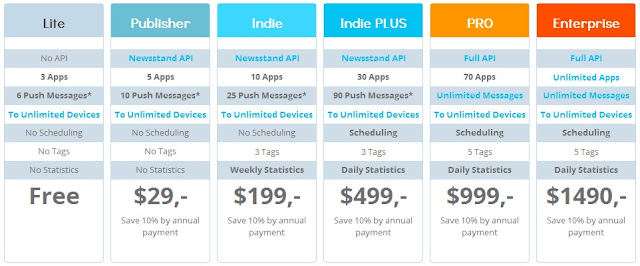
Free tools is good for indies and kickstarter, Many of services become free to try out which is great. I accidentally run into this push notification service https://pushwizard.com/

and after take look at pricing page I found out that it's really interesting free plan offered there.


I will do "in deep" review for this API like usual (they kind enough to let me try (some of) their API), and that should take some (of my free) time.

BTW, anyone want an Free ANE for this one? Please leave comment below more than 10 requests should be enough for headache ;)

PS : like always, anyone got alternate competitive Push Notification Service please leave comment below (even DIY solution is welcome, I'm always seeking for the best) I will take a look and try compare pros and cons here.

Happy Coding :)

UPDATE : Even more free service as BaaS!

Saturday, December 8, 2012

[ANE] Pay It Forward, More Free ANE!

I using Free ANE and also learning from their code. So it's time to payback! I will list my public (some is remain private for my client) ANE stuff here.


Public and open source

Private use 

  • ane-parse-com : ANE for Parse.com SDK including Push Notification in Java (iOS didn't need ANE), Anyone need this please leave comment below or email me katopz(at)gmail.com :)

For other free ANE try here


PS : If you need more ANE or Android version, Don't forget to feed my cat

Sunday, November 11, 2012

[Xcode] Summon UniBeast on PC for Xcode


I'll post my journey through Mac via PC here, you can expected more update later ;)

What's PC spec?

I install to my good old PC instead of buying new one (yes i'm poor) which is...
  • ASUS P7P55D PRO Intel P55 Express Chipset Mainboard for Intel LGA 1156
  • Intel Core i5-650 3.2 GHz  [LGA 1156]
  • G.SKILL F3-12800CL9T NQ Series 3GB (3x 1GB) DDR3-1600 240-Pin CL9 RAM
  • EVGA GTS250 PCIExpressx16 Gen 2 1G GDDR3 // old card but still fast enough
  • ST3750330AS 750MB // yes, old HD perfect for testing ;)
  • LG E2360 - DVI
  • LG W2261- HDMI // won't work, freeze when plug it in ;(

How?

  1. Try install UniBeast : http://www.tonymacx86.com/61-unibeast-install-os-x-mountain-lion-any-supported-intel-based-pc.html // super geek installation, you can break your computer in every step, but when it's done it's just working like Mac
  2. If it not work, try EasyBeast only and don't install any driver yet. // i've have to use this method with out UserDSDT and only EasyBeast checked and reboot then try add lnx2mac's realtek rtl81xx ethernet later.

Any suggestion?

  1. Unplug as any USB possible.
  2. Unplug any HD as possible.
  3. My audio need this fix : http://www.tonymacx86.com/audio/63663-asus-p7p55d-enable-via-vt1828s-sound-10-8-a.html
  4. after switching from IDE to AHCI you need to reboot it twice to let bios scan hard disk all over again and also make sure boot drive is set.

Tune your Mac like PC

  1. make Mac keyboard behavior as PC : http://doublecommand.sourceforge.net
  2. invert scroll wheel in your setting // mouse rules!
  3. remap Windows key (Command key) to CTRL key and you can copy/paste like before.
  4. remap Home End behaviour like Windows : http://www.starryhope.com/mac-os-x-home-and-end-keys/
  5. to switch language with grave accent : https://pqrs.org/macosx/keyremap4macbook/
  6. stupid copy/paste merge...try alt while drag/drop or ForkLift
  7. to batch like DOS (foo.bat) in Mac is create file "foo.sh" begin with "#!/bin/bash" follow with your cmd e.g. echo "Hello World!" it will look like...

    #!/bin/bash
    echo "Hello World"

    save and then "chmod u+x foo.sh" and run it with "sh foo.sh" // easier in Windows!
  8. view all hidden file open terminal and...
    
    defaults write com.apple.Finder AppleShowAllFiles YES
    
    then alt+right click at Finder then select Relaunch 

Pro?

  1. cheaper than buy new Mac. // poor me
  2. faster than VMWare. // bye bye VMWare

Cons?

  1. Dual monitor HDMI will freeze. // something todo with my GTS250 driver...
  2. You Windows 7 MBR can be broken after try switching where to boot between OS. // i did have to reinstall Windows 7 ;p
Now install XCODE and  have fun developing! :)